How do I find and connect my Seismofit® Sensor to the VentriJect App?
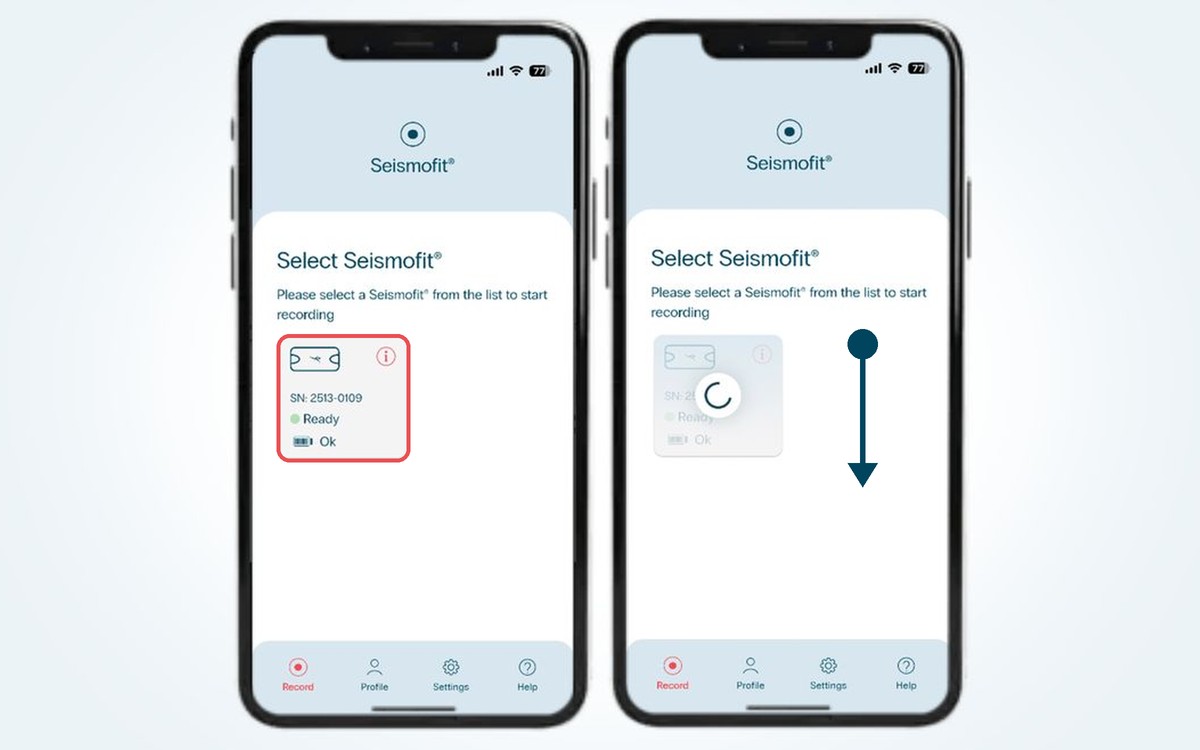
Finding and selecting your sensor The VentriJect App searches for nearby Seismofit® Sensors as soon as you open it. Your sensor appears in the list when it has a working battery and is within 1 meter of your device. If more than one sensor appears, select the one whose serial number (SN) matches the number on the back of your sensor.
Sensor not in the list? If you don’t see your sensor in the list, you can manually trigger a new search:
Place one finger in the center of the screen
Pull down gently
Release to start a new scan
Watch for the refresh symbol that briefly appears at the top of your screen
Please note that a sensor can only connect to one phone or tablet at a time. If it was last used with another device, fully close the app or turn off Bluetooth on that device before connecting again.
Need additional assistance? Contact our support team at support@ventriject.com or submit a request through the self-service portal. For detailed operating guidance, please refer to the latest Seismofit® Sensor Instructions for Use (IFU).