Receive reports automatically by email After every measurement, a PDF report is emailed automatically. When we set up your account, we send reports either to:
Each operator’s own email, or
One shared company inbox, useful if you measure on several devices or at several locations.
To change this, email support@ventriject.com. If a report is missing, check your spam folder first. If it is not there, email us your sensor’s serial number (SN) and the date and time of the measurement, and we will resend it.
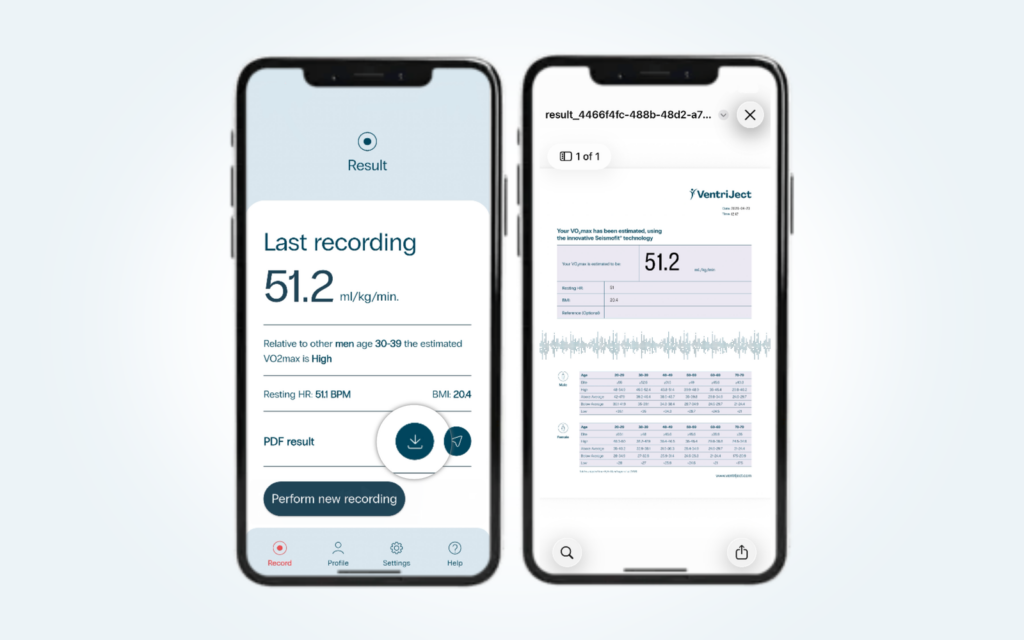
Save a report from the app The app does not keep a history of your measurements, but you can save a report yourself:
Complete your measurement. Your results appear on the Result screen.
Tap the download icon next to PDF result.
When the report opens, tap the share icon to save or send it.
Do this before tapping Perform new recording, as the previous result cannot be retrieved afterwards.
Store your reports in one place Keep your PDF reports in a secure folder or your clinic’s record system so you can compare results over time.
Keep the app updated Install updates from the App Store or Google Play to get the latest features and security fixes.
Still need help?
Need additional assistance? Contact our support team at support@ventriject.com or submit a request through the self-service portal. For detailed operating guidance, please refer to the latest Seismofit® Sensor Instructions for Use (IFU).